Drum instruments: articulations, note routing and pedal response
Shared performance research for the eighteen one-shot instruments, with product-specific articulation behavior.
Technical research · edition 2 · reviewed 2026-10-24
Prismal Labs native editor capture, illustrating the corresponding software project. View full-size image
What we found
Shared drum controls are useful only when their meanings remain instrument-specific. Our articulation work found that “any note triggers a hit” becomes ambiguous once note maps, key follow, pedal CC and saved legacy behavior coexist. The solution was explicit play modes, explicit articulation identities and calibration rules that can be tested independently of timbre.
The most transferable findings concern continuous hi-hat openness, choking notes that are already ringing, velocity calibration and migration. These are performance contracts; passing them does not establish the sound of a particular drum machine.
The hi-hat adaptation
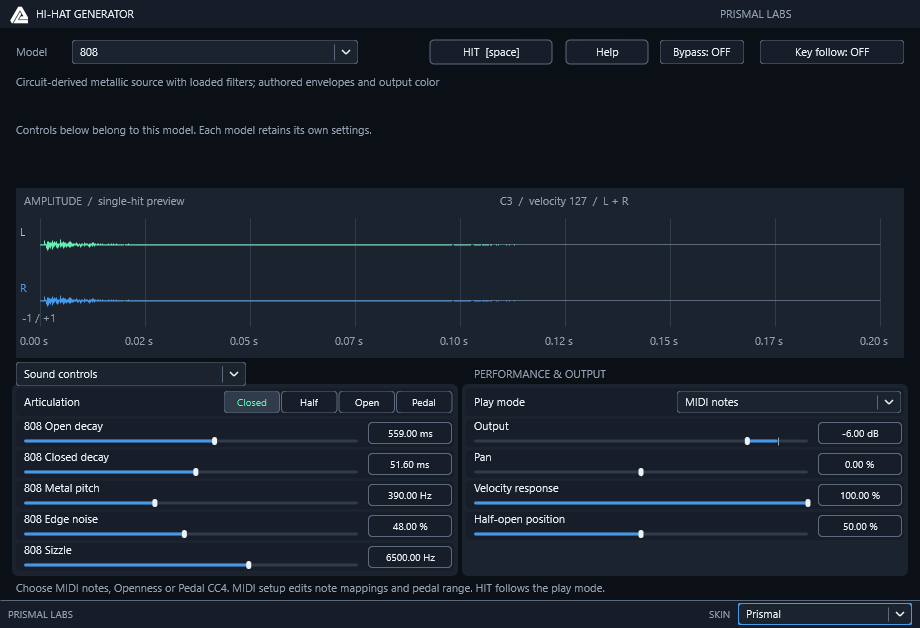
Use Superior's explicit programmed-note versus calibrated-pedal workflow in a small synthesizer. This is an independently written implementation, without commercial code, artwork, presets or sample libraries.
- Four one-click Closed/Half/Open/Pedal buttons replace the articulation menu in note modes. Four editable note assignments default to 42/23/46/44.
- Play modes are Legacy notes, MIDI notes, Openness and Pedal CC4. New instances start in MIDI notes; v1–v3 projects migrate to Legacy notes with exactly their old note/articulation policy and parameter meanings.
- Openness provides a continuous 0–100% automation lane. Synthesis interpolates logarithmically between each model's closed/open T60. Pedal CC4 does the same after endpoint calibration. Reversing the endpoints reverses polarity; equal endpoints fail closed. Values outside the range clamp to the nearest endpoint.
- Every MIDI channel receives an independent CC4 parameter, position and choke domain. Monitor channel selects the visible controller value and HIT/preview channel. This is explicit channel selection, not automatic detection. HIT/preview bypass MIDI note assignments and always follow the selected manual articulation or current openness.
- Closing damps a ringing controlled hat; reaching the closed endpoint uses the established 2 ms fade without requiring another note. Partial closing adds an exponential damper. Reopening never restores energy already dissipated.
- Pedal chick can come from the mapped MIDI note or be generated from fast CC4 closure. Automatic mode suppresses that mapped foot note. Detection arms above 25% openness and accepts movement below 2% within 100 ms of crossing 25%. Initial values, state loading, calibration changes and zero-frame host flushes never generate a chick. These thresholds are authored choices, not copied vendor internals or hardware measurements.
- The MIDI setup editor page contains note assignments and pedal endpoints; sound controls remain available on their own page. Page navigation is UI state.
- Selected recording continues to play the exact browser selection. Articulation slots choose the nearest Closed/Half/Open region with boundaries halfway to the selected half-open position. Partial PCM playback uses a software damper.
Our private bank has three openness slots and no measured pedal recording. This does not reproduce Superior's multi-zone, multi-velocity sample library, its foot-splash behavior or its controller preset library. More openness in the synthesized envelope is continuous; selecting an authored PCM slot is discrete. The existing circuit-derived metallic front ends, source phase, filter loads, 8× processing factor and 32-frame latency are unchanged.
Evidence: research/drums/HIHAT-ARTICULATION-RESEARCH.md.
One workflow, distinct instruments
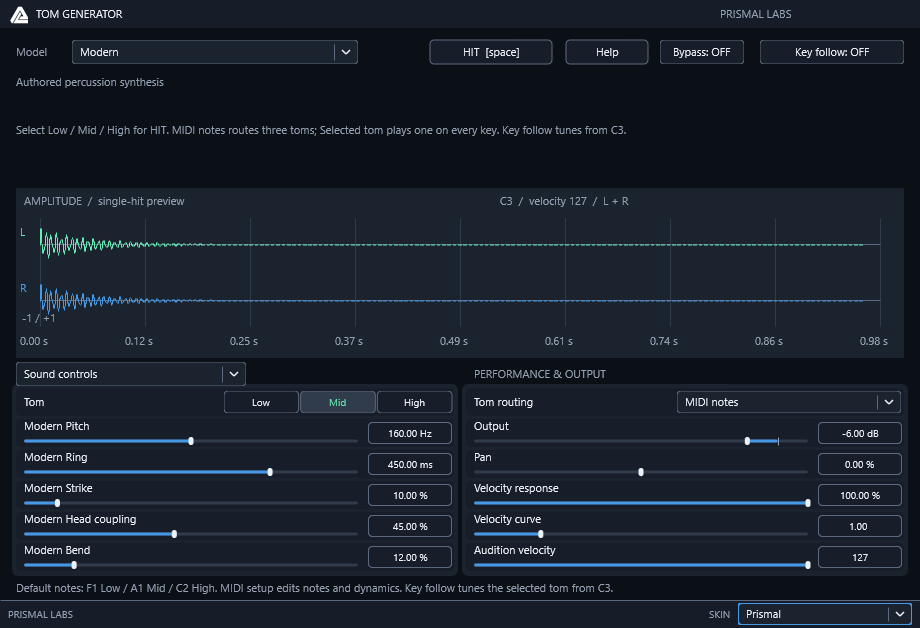
The Kick and Snare editors expose Sound controls and MIDI setup without changing any sound when the page switches. New Snare instances use MIDI notes so their stroke assignments work immediately. Selected stroke (formerly All notes) uses one chosen stroke on every key; existing v3/v4 routing is preserved. Snare's MIDI setup puts Stroke routing first. Kick retains All notes by default; MIDI notes enables its explicit map. Input channel 0 means Any, otherwise 1–16. Key follow / Key track accepts chromatic notes in either mode while preserving the channel filter. Existing pitch reference notes remain 60 for Snare and 36 for Kick. HIT and the waveform bypass note filtering and use Audition velocity on the selected channel. Kick sound presets preserve all MIDI setup fields.
The Kick, Snare and HiHat implementation established shared Live-style note names: MIDI 0 = C-2,
60 = C3, 127 = G8, as in Live's full note range.
Only note assignments use names; velocity, channels and CC remain numeric.
shared/include/prismal/midi/note_names.h formats names and parses ASCII
sharps/flats, lowercase/whitespace and exact raw numbers. Parsing rejects invalid
or out-of-range notes atomically. Product IDs and stored pitch values are unchanged.
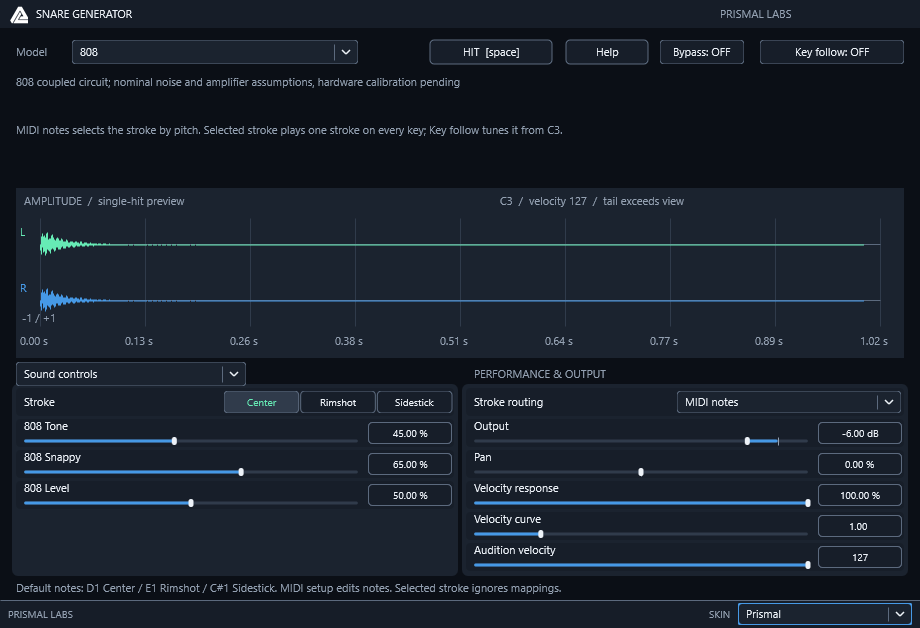
Snare has one-click Center / Rimshot / Sidestick controls. MIDI mapping defaults to D1/E1/C#1 (38/40/37); duplicate assignments prefer Center, then Rimshot. The 808 Center path retains its coupled circuit, clocks, coefficients and persistent charge. Rimshot layers an authored Wood excitation outside that circuit. Sidestick uses an authored Wood excitation. These extensions are not measured 808 rim circuits. Other synthesized models use the same authored rim policy. SR-16 Selected recording keeps the browser selection for every stroke; Articulation slots routes three persisted catalog selectors. Defaults are zPure Snr, zRim2Cntr, zSideStik. The existing portable missing-bank preview policy remains; it is not a recording.
Kick maps two editable aliases, initially C1 and B0 (36 and 35), to the same beater voice. An unmapped note produces no new voice. Note-offs retain their original note ID and channel ownership even after a map/channel change, so gated notes can release. The researched kick models and original stereo SR-16 playback remain intact.
Controller velocity is calibrated before the existing product response:
u = clamp((127*v - low) / (high - low), 0, 1); calibrated = u^curve
The identity defaults are 0/127, curve 1; this path returns the original positive velocity exactly. Endpoint order is normalized; equal endpoints form a threshold. Curve below 1 raises soft hits; above 1 softens them. Nonpositive/nonfinite note velocity remains silent, including when the existing Velocity response is flat. Audition velocity is 1–127 and passes through this same calibration.
At the documented Kick/Snare migration checkpoint, Snare appended IDs 153–166 and wrote state v4 (536 bytes), reading its shipped v3 sound prefix unchanged. Kick appended IDs 129–136 and wrote v7 (292 bytes), reading v6 unchanged. Older retired Snare v1/v2 and Kick pre-v6 states stay unsupported. No prior parameter or format identity is remapped.
Evidence: research/drums/DRUM-PERFORMANCE-WORKFLOW.md.
A repeatable acceptance process
Our host checks separated four questions that a single audio render could not answer:
- Does the engine preserve its contract? Processor, state, automation and allocation checks cover the declared note map, calibration and callback behavior. The installed module is checked separately from the development binary.
- Is the host actually routing it? A copied Live fixture uses known MIDI, enabled devices, enabled track speakers and unity mixer trim. Device On and track Speaker are independent; confusing them can make a working instrument appear silent.
- Does calibration produce the predicted signal? The documented fixture exports four bars at 48 kHz, stereo float32, with normalization disabled. The recorded-sample comparisons require at least 100 dB fixed-gain PCM agreement and fit neither gain nor delay. The first beat is excluded because Kick's 5 ms output smoothing can depend on offline preroll. This tolerance belongs to those deterministic playback cases, not to synthesized drums or hardware fidelity.
- Does the behavior survive a session? Native control edits, host Undo, saved mapping bytes, reopened controls and actual MIDI/audio behavior are checked together. A serialized field alone cannot prove that the next note uses it.
Fresh insertion and migrated sessions need separate fixtures. A prepared state can hide an incorrect factory default; a fresh instance cannot exercise a legacy reader. These findings apply equally to sample players, controllers and instruments with multiple routing modes.
Evidence: research/drums/DRUM-PERFORMANCE-WORKFLOW.md.
A default-note regression that only a fresh instance exposed
For a routing/default or note-presentation change, add --fresh-snare to the
preparation command. Fresh Snare.als contains one MIDI track and no plug-in.
Insert the installed Snare through Live's browser so a prepared processor state
cannot mask a wrong factory default. The default 808 clip repeats D1/E1/C#1/C1
(raw pitches 38/40/37/36) at velocity 100. Confirm MIDI setup → Stroke routing →
MIDI notes without enabling it manually. Check typed C-2/G8, host Undo and saved
raw pitches. Existing v4 Selected stroke states must retain their choice.
Export Main with the same four-bar/48 kHz/float32/Normalize Off settings as above,
using Snare Default 808.wav. Run:
The audio check requires all twelve mapped attacks, quiet unmapped residuals and three distinct mean attack levels. Its thresholds cover this default 808 fixture; they do not establish circuit/hardware fidelity. The persistent circuit may leave a quiet tail during the unmapped beat. The state checker requires model 808, MIDI notes, the default assignments and the unchanged selected-recording policy. Reopen the saved Set in a fresh owned process and check the fields and MIDI output. Root performance tests also render all three mapped notes through every synthesized model and check finite, distinct, bounded output without realtime allocation.
New generators should reuse this process and shared contracts while implementing only strokes supported by their synthesis or explicit recording catalogs. Actual host checks remain distinct from numerical fidelity and hardware measurements.
Evidence: research/drums/DRUM-PERFORMANCE-WORKFLOW.md.
Applying the findings
Keep note routing, articulation and pitch as separate decisions. Decide the articulation first, then apply the selected key-follow policy. Calibrate a pedal's open/closed endpoints and inversion before using its normalized value. A continuously closing pedal should be able to damp an existing open note; changing only the next note's envelope misses the performance gesture.
Test both fresh defaults and migrated sessions. Exercise mapped notes, unmapped notes, audition, two MIDI channels, overlapping hits, and controller movement without a new note. A waveform preview should use the same current voice settings and articulation contract as the engine, so it can reveal routing mistakes rather than merely illustrate a preset.
Limits and open questions
Pedal/chick thresholds, calibration, software choke fades and additional articulation choices are product policies unless established by hardware evidence. Separate instances do not share a physical kit's oscillator/noise/voice resources automatically. Older notes about source-only sibling products describe historical checkpoints; the current private family includes all eighteen one-shot instruments.
Research illustrations
Prismal Labs native editor capture, illustrating the corresponding software project. View full-size image
Prismal Labs native editor capture, illustrating the corresponding software project. View full-size image
Primary references
Research provenance
The methods and results above are drawn from these retained research records. Dates and product versions inside the article identify the scope of each experiment; publication review does not mean the hardware or numerical tests were rerun.
research/drums/HIHAT-ARTICULATION-RESEARCH.md— SHA-256ad2a625cb7b7b55f5025984d7e574c37f840c95d2c1f5ce41a487dff304ac924research/drums/DRUM-PERFORMANCE-WORKFLOW.md— SHA-2569acdc0cb1061f09ef5fec5af7163587d087b26bde0e86bd72b12d0da41eb14e5
Related projects
KickGenerator · SnareGenerator · HiHatGenerator · TomGenerator · CymbalGenerator · ClapGenerator · RimGenerator · ClaveGenerator · WoodblockGenerator · CongaGenerator · CowbellGenerator · AgogoGenerator · TriangleGenerator · TambourineGenerator · ShakerGenerator · TimbaleGenerator · SnapGenerator · PercussionGenerator