Encoder Feedback
Normal, volume, pan, and endless encoder feedback patterns for the APC40.
The encoder / potentiometer types needed are:
- Normal
- Volume
- Pan
- Endless / Relative
Normal Encoder
Functionality: When the encoder/pot is turned, the value is displayed as a single LED in the ring and constrained to a 0–127 MIDI CC value.
Explanation: The MIDI input’s value is passed directly to the MIDI output.
Volume Encoder
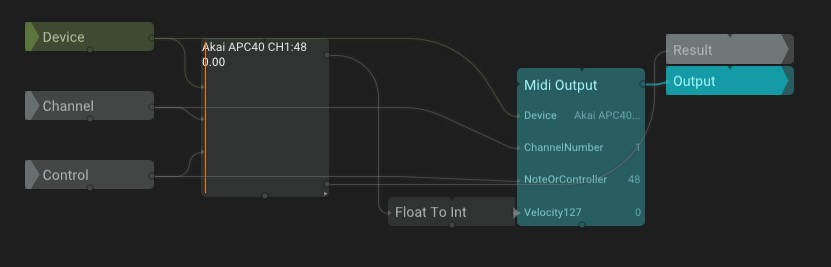
Functionality: When the encoder/pot is turned, the value is displayed as a region of LEDs in the ring between 0 and the current value.
Explanation: This is the same as the normal encoder, but we need to send a specific Velocity on a CC that is 8 above what we use for LED feedback. This takes care of changing the mode of the encoder. Velocity is `2` for Volume mode.
Pan Encoder
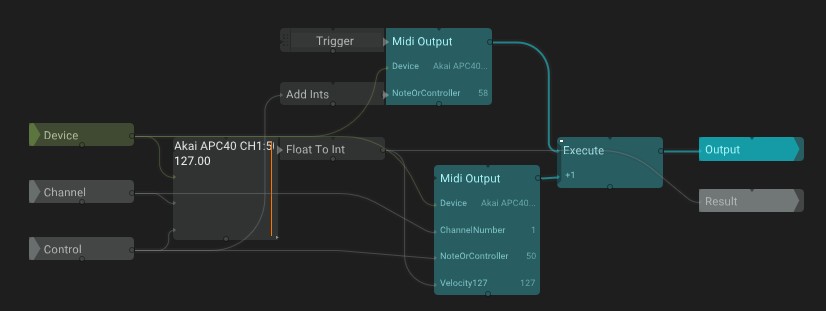
Functionality: When the encoder/pot is turned, the value is displayed as a region of LEDs in the ring between 63 (center) and the current value.
Explanation: This is the same as the volume encoder, but with a different mode. Velocity is `3` for Panning mode.
Endless Encoder
Functionality: When the encoder/pot is turned, the value is displayed as a single LED that loops continuously around the ring.
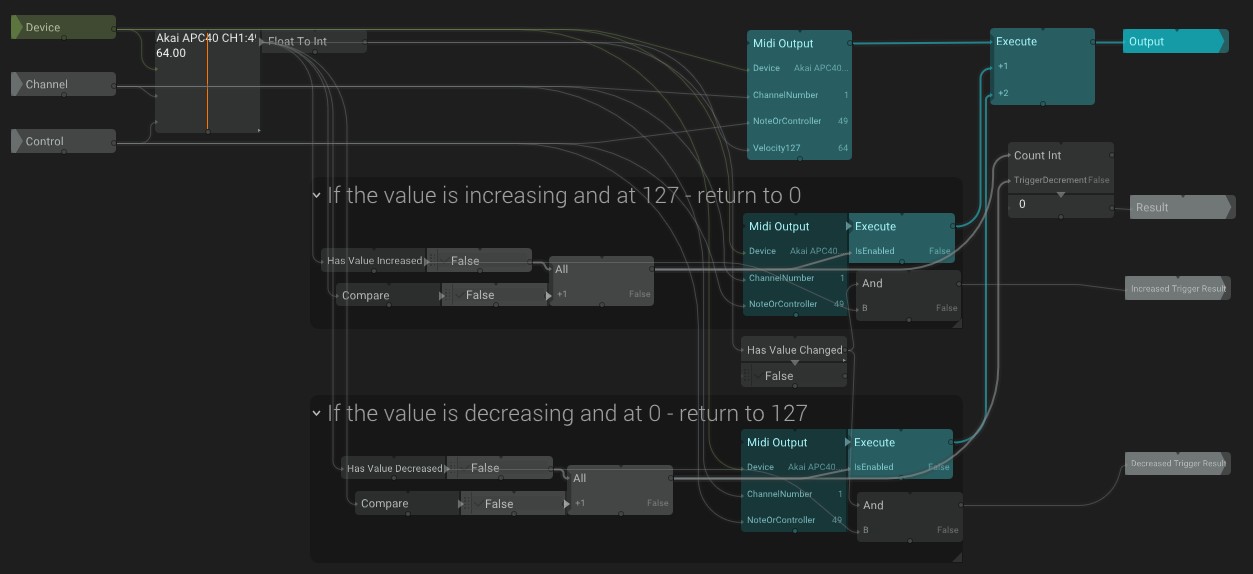
Explanation: This was the most difficult encoder type to implement, mainly because there were issues with the `HasValueDecreased` operator in TiXL.
To start, the MIDI value is passed directly to the output like the other encoders, but modulo functionality must also be handled. The two groups are basically identical:
If the value is increasing and at 127 — return to 0
- `HasValueIncreased` returns true if the incoming value is larger than the previous value.
- `Compare` checks if the incoming value is equal to `127`.
- `All` checks if both are true.
When the value is `127` and still trying to increase, the attached Execute enables a MidiOutput that sends a Velocity of `0`.
If the value is decreasing and at 0 — return to 127
- `HasValueDecreased` returns true if the incoming value is smaller than the previous value.
- `Compare` checks if the incoming value is equal to `0`.
When the value is `0` and still trying to decrease, the value loops back to `127`.
Result Output
Both groups share a `HasValueChanged` trigger. If the value increases, trigger `TriggerIncrement` in `CountInt`; if it decreases, trigger `TriggerDecrement`. `CountInt` is sent to the Result.
The Result output can be used for things that loop like rotations, where you don’t want to be constrained by a 0–127 range.