
Button Feedback
Reusable trigger, toggle, and hold button patterns for the APC40.
Let’s start with the basics. What will we need to take as input, and what should we be outputting?
I want to take a modular approach so these are reusable, and keep things flexible so they can be used with other devices if possible.
Input
- Device: The device we are controlling
- Channel: The MIDI channel we are listening on and sending to
- Control: The MIDI note/CC on that channel
Output
- Result: A Boolean value representing the button state
- Output: Passes the MIDI data down to an execute operator
Trigger Button
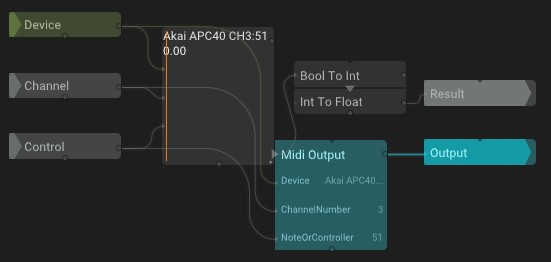
Functionality: When the button is pressed, it sends a single positive pulse to the result and to the MIDI channel and CC/note number of the APC40.
Explanation: The MIDI input’s `WasHit` is connected directly to the MIDI output. This allows the pulse from `WasHit` to also light the button. `WasHit` is passed as a Boolean `Result`.
Toggle Button
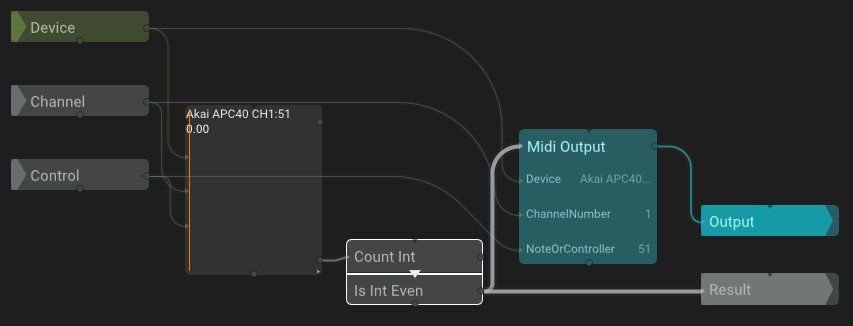
Functionality: When the button is pressed, it toggles between the on and off states and outputs that state both as the result and to the APC40.
Explanation: From the MIDI input, count every time `WasHit` is triggered. If the counter is even, send a positive value to the MIDI output and result. Set the default value on `CountInt` to `1`, since `IfIntEven` should start in an off/false/odd state. Set the modulo on `CountInt` to `2` so the counter flips between `0` and `1`.
Hold Button
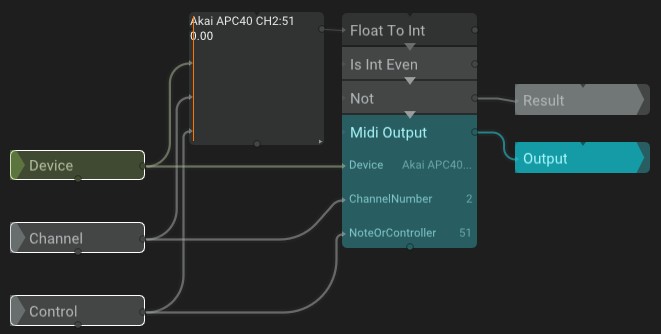
Functionality: When the button is pressed, it continuously sends a positive value as the result and to the APC40.
Explanation: Convert the MIDI input float to an integer using `FloatToInt`, then convert the integer to a Boolean using `IsIntEven`. Since the on state of the float is `1`, this is an odd number, so invert the Boolean using `NOT`.
What might we need to extend?
- Define the color of OFF states
- Define the color of ON states